
Blog Post
When accessing your Google Maps API, your key has expired if you see an ExpiredKeyMapError. To resolve this, you will need to create a new key and update your code to use the new key.
Causes Of Expiredkeymaperror
The ExpiredKeyMapError indicates that the key mapping for the account has expired. The key mapping can expire for some reasons, including:
- The account was created more than 30 days ago and has not been used since
- The account was created within the last 30 days, but the password has been reset
- The account was created within the last 30 days, but the email address has been changed
HOW TO RESOLVE EXPIREDKEYMAPERROR
-
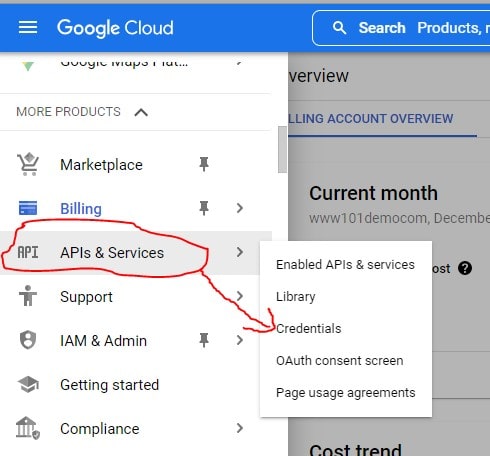
Click On The API’s & Services Menu Item.
-
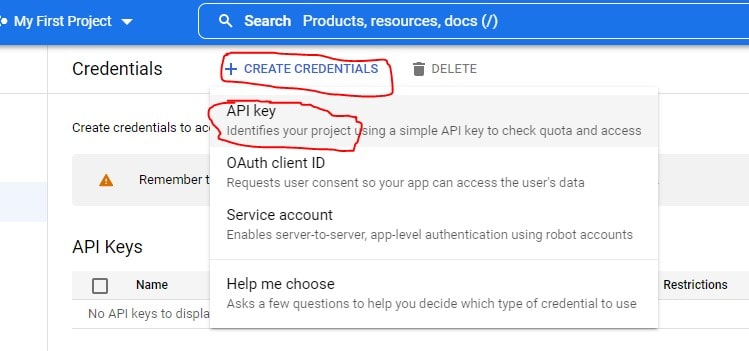
Click The Create Credentials Button>Select The API Key From The Drop-Down Menu.
-
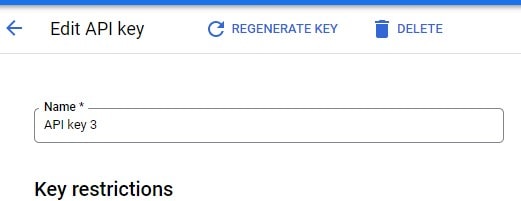
Name Your Key > Click On The Create Button.
-
Copy Your New Key > Update Your Code With The New Key Value.

Conclusion
If you are seeing this error, it is likely because one of these things has happened. To resolve the issue, you must create a new key mapping for your account Follow the above steps.

Recent Posts
Loading recent posts...